
MCP server
Let your AI agent
read the real schema.
HuginnDB ships huginndb-mcp, a headless Model Context Protocol server installed as a sidecar next to the app. It reuses the connection profiles and keychain passwords you already have, so an agent works against your actual database instead of guessing schema from memory.
Any MCP client

Read-only by default
huginndb-mcp · stdio
- Claude Code
One command and the agent has your schema in context.
- Claude Desktop
Local app, local connections, no tunnel.
- Cursor
Schema context right inside the editor.
- Antigravity
Same stdio config as the rest.
- Codex CLI
Agent runs queries under the policy you set.
Writes are opt-in, per connection
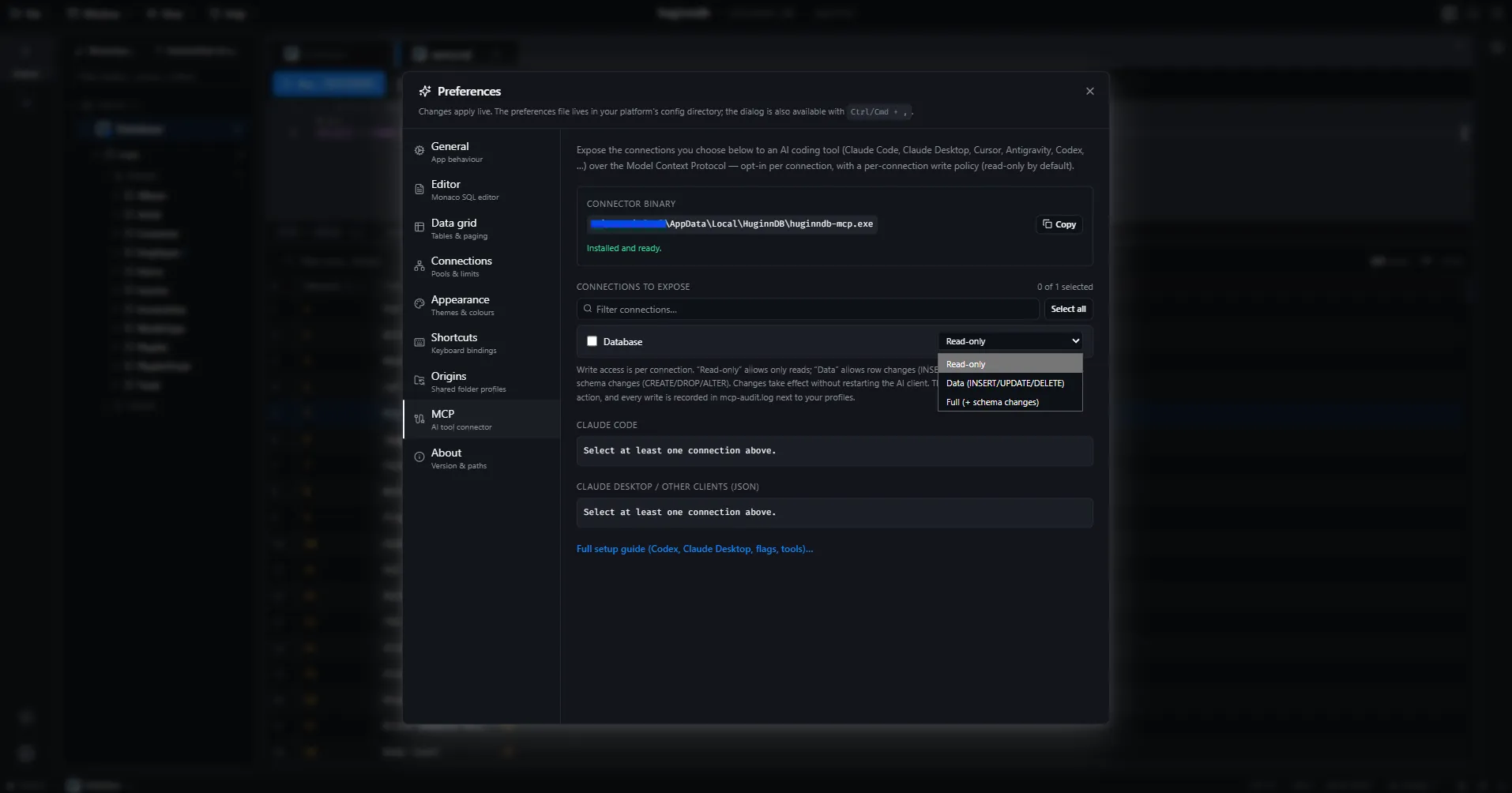
Every exposed connection carries a write policy, set in Preferences → MCP and re-read from disk on every write attempt. Nothing is writable until you say so.
- read-only
- The default. Reads only — no tool can change a row.
- data
- Row-level writes: insert, update a cell, delete rows.
- full
- Everything the connected user is allowed to do.
The tools an agent gets
Seventeen read tools always — seven of them Pulse’s — plus seven write tools, each of which needs a connection’s policy to allow it first.
list_connectionslist_databaseslist_tablesdescribe_tablelist_indexesrun_querybrowse_tableserver_versionlist_userslist_privilegespulse_healthpulse_metricspulse_top_queriespulse_explainpulse_storagepulse_sessionspulse_index_usageinsert_row· policy-gatedupdate_cell· policy-gateddelete_rows· policy-gatedcreate_index· policy-gateddrop_index· policy-gatedsave_view· policy-gateddrop_view· policy-gated
Guard rails
- Every write attempt — success or failure — is appended to mcp-audit.log.
- A whole-table UPDATE or DELETE with no WHERE clause is refused outright, at any policy level.
- The server opens pools lazily, and only for the connections you explicitly expose.
- Passwords are resolved from the OS keychain at the moment of use, never copied into a config file.
Point your client at it
Preferences → MCP prints the resolved sidecar path and generates the exact config for your client. Copy it, paste it, restart the client.
Claude Code
claude mcp add huginndb -s user -- /path/to/huginndb/huginndb-mcp --connections <profile-id>Claude Desktop
{
  "mcpServers": {
    "huginndb": {
      "command": "/path/to/huginndb/huginndb-mcp",
      "args": ["--connections", "<profile-id>"]
    }
  }
}Cursor
{
  "mcpServers": {
    "huginndb": {
      "command": "/path/to/huginndb/huginndb-mcp",
      "args": ["--connections", "<profile-id>"]
    }
  }
}Antigravity
{
  "mcpServers": {
    "huginndb": {
      "command": "/path/to/huginndb/huginndb-mcp",
      "args": ["--connections", "<profile-id>"]
    }
  }
}Codex CLI
[mcp_servers.huginndb]
command = "/path/to/huginndb/huginndb-mcp"
args = ["--connections", "<profile-id>"]
Replace the path with the one Preferences → MCP shows, and <profile-id> with the connection you want to expose. Read the docs